
Your entire local dev stack.
One menu bar.
Start, stop and monitor dev servers, Homebrew services, Docker containers and AI coding agents from one lightweight macOS app — with live health, CPU and memory, port-conflict detection, and an amber glyph the moment an agent is waiting on you.
or with Homebrew brew install --cask manustays/tools/quay
One universal build for Apple Silicon and Intel. Releases aren't notarized yet, so the first launch needs System Settings → Privacy & Security → Open Anyway — right-click → Open no longer works on recent macOS. Fully open source under MIT.
- macOS
- Universal
- Rust + TypeScript
- Tauri v2
- MIT
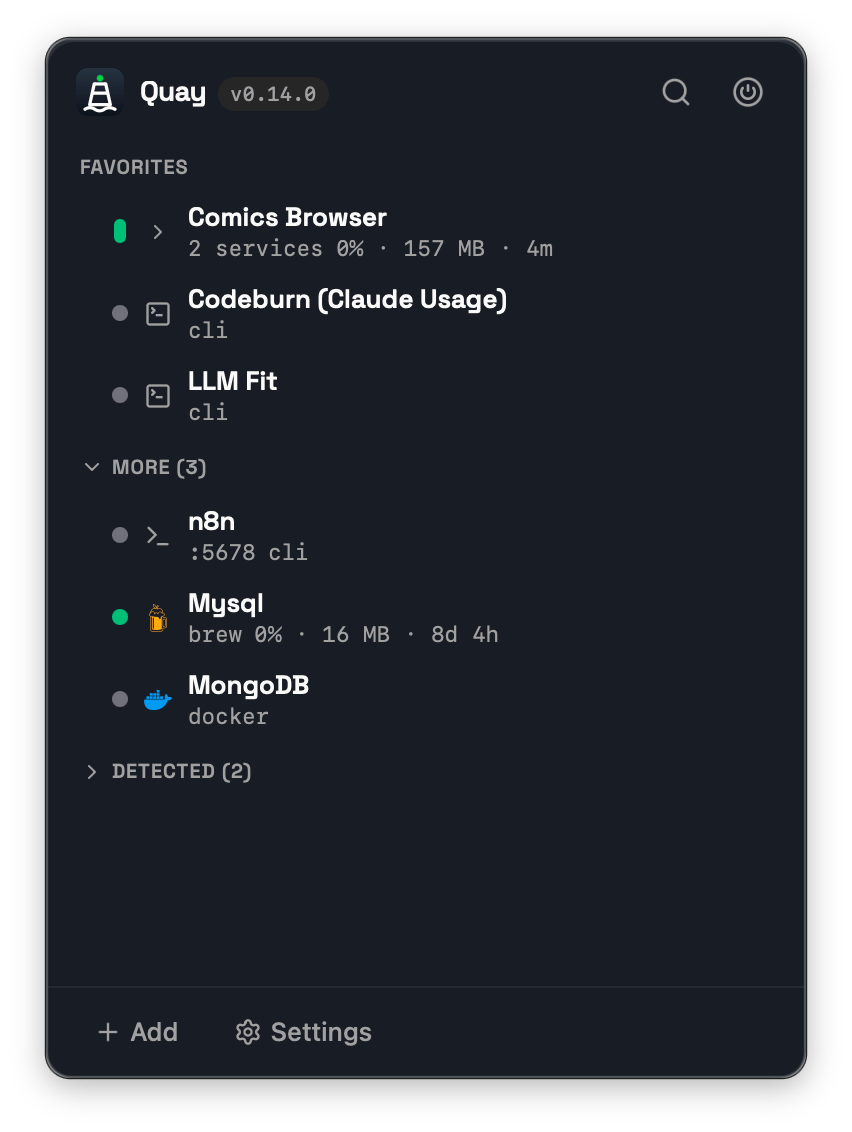
What a good local day looks like
Start your stack in seconds
Your frontend, API and Redis sit together as one group — start them from the menu bar in seconds, no terminal tabs to hunt down.
Find what stole your port
Port radar spots the unmanaged process on a port. Open it in the browser to identify it, then adopt it into Quay or terminate it.
Keep heavy services visible
Watch CPU, memory, uptime and health right from the menu bar — no need to open Activity Monitor.
Your coding agents, on the same shelf
Claude Code, Codex CLI, OpenCode and Pi sessions appear beside your services — so an agent that finished twenty minutes ago, or one stuck at a permission prompt, isn't a terminal window you forgot to check.
It never reads your transcripts
Each agent reports its own lifecycle through a tiny hook, so Quay never opens the session files under
~/.claude,~/.codexor~/.pi. Nothing about your prompts or projects is read, stored or sent.Know when one needs you
Working, idle, or waiting on you at a permission prompt. The menu bar glyph turns amber while the popover is shut, so a blocked agent doesn't sit there unanswered while you're in another window.
Jump straight back in
One click focuses that session's own terminal. Sessions in the same folder club into a single project row, with the session name on hover and live CPU, memory and uptime per agent.
Hooks install in one click from Settings — no terminal, and no restarting the sessions you already have open; a running session appears as soon as it next reports. Until an agent's hooks are installed its sessions stay invisible, and the Agents list tells you so. Jump-to-session also covers Cmux, Herdr and Supacode; it needs remote control switched on for Kitty, and doesn't reach bare tmux, screen or zellij panes.
Five kinds of service. One place.
Project servers
Next.js, Vite, Django, Rails — auto-detected from your project config and grouped into one stack.
Homebrew services
Redis, Postgres, MySQL, MongoDB. Start and stop brew services without touching the terminal.
Docker containers
Pick an image from the ones you've already pulled. Quay starts the daemon if it needs to, and reuses an existing container rather than discarding its data.
Terminal & CLI tools
Long-running interactive tools you register yourself, started and stopped like any other service. Agent sessions you launched in your own terminal show up in the agent radar instead.
Daemons with their own CLI
Anything driven by a start and stop command pair — a launchd service, a local model server. Status is polled even while it's stopped, so a change you made outside Quay still shows up.
More than a port monitor
Most tools stop at listening ports. Quay manages the whole stack — the rows below are where it pulls ahead.
| Capability | Typical port monitor | Quay |
|---|---|---|
| See listening ports | Yes | Yes |
| Kill port / process | Yes | Yes |
| Manage project servers | Some | Yes |
| Homebrew services | — | Yes |
| Docker containers | Some | Yes |
| Terminal & CLI services | — | Yes |
| CPU & memory per service | — | Yes |
| HTTP health checks | Some | Yes |
| Auto-detect project config | Some | Yes |
| Adopt unmanaged processes | Some | Yes |
| Group full stacks | — | Yes |
| AI agent session states | — | Yes |
| Waiting-for-you menu bar signal | — | Yes |
| Jump to the agent's terminal | — | Yes |
Measured, not claimed
An app you never quit should cost nothing while you aren't looking at it. Numbers from a debug build with seven services registered, sampled by a script that ships in the repo.
| What you're doing | CPU | Interface | Idle wakeups |
|---|---|---|---|
| Sitting in the menu bar — the everyday case | 0.10% | 0.00% | 0.0 / min |
| Popover open, watching your services | 0.45% | 0.51% | 4.0 / min |
These come from a debug build; a release bundle reads several times lower, so treat them as the pessimistic figure. Absolutes depend on how many services you've registered — the comparable number is the difference between the two rows, and opening the popover costs about 0.35 percentage points of CPU in this configuration. Reproduce it with scripts/cpu-check.sh.
And it stops when you do. Polling parks entirely while every display is asleep or the Mac is locked — overnight with the lid shut, Quay runs no status passes rather than roughly 1,200 an hour. There's no setting for it; it's the default.
Up and running in a minute
Install
Run
brew install --cask manustays/tools/quay, or download the.dmgfrom Releases and drag Quay to/Applications.Add a service
Hit
+ Add, pick a project folder — Quay auto-fills the start command and port.Control it
Start, stop, open in the browser or jump to a terminal — all from the menu bar.
Let it keep itself current
Updates are signed with their own key, independent of Apple notarization — so in-app updating works even on today's unsigned builds.
Open source you can trust
MIT licensed
A permissive license — use, fork and ship it however you like.
Fully local
Your services and settings never leave your Mac, and Quay never reads your agents' session files — their states come from the agents themselves.
No account
No sign-up, no login. Download it and go.
No telemetry
No tracking, no analytics, nothing phoned home about what you run. The only outbound traffic is GitHub Releases, to check for and download updates.
Rust + TypeScript
A Tauri app: a fast Rust core with a TypeScript interface.
Lightweight
Native and lean — no Electron, no bundled browser.
Enjoying Quay?
Quay is free and open source, built in my spare time. If it saves you time, a one-time sponsorship — or even a quick star — genuinely helps and keeps me motivated.
No pressure — Quay stays free either way.
MIT © 2026 Kumar Abhishek